
REVIEW – Boston Dynamics made the modern robot dog feel both amazing and a little unsettling with Spot. I still think of those videos where Spot trots around, gets shoved, rights itself, and keeps going like a tiny warning from a Black Mirror story. Petoi Bittle borrows that familiar four legged silhouette, but this is not a miniature Spot. It is a small, open source robot dog kit for makers, students, and programmers who want to build, tune, and code their own quadruped. I tested the $259 Base Kit, while Petoi also sells more complete bundles up to the $439 Developer Kit. Bittle is not cheap, and it is not effortless, but it is one of those gadgets that keeps rewarding curiosity.
What Bittle is
The Petoi Bittle Open Source Robot Dog is a servo driven quadruped robot that arrives as a build it yourself kit. Once assembled, it can be run from the included infrared remote, a smartphone over Bluetooth, WiFi, or a computer connected through the USB adapter. It supports Scratch style block coding through CodeCraft, Arduino IDE work, C++, and Python through Petoi’s APIs and tools.
The Base Kit I reviewed comes partly pre assembled, which lowers the intimidation level without removing the hands on work. Petoi also designed Bittle around expansion, so the NyBoard controller can accept different adapters, sensor modules, and even a Raspberry Pi for more advanced projects.


In the box
Bittle’s box is compact, but Petoi fills it with a surprising number of mechanical, electrical, and control pieces. The parts are held in molded trays and cardboard, and the Base Kit includes the main body components, controller board, power system, servos, adapters, and basic tools needed to get started.
- Bittle body pieces:
- Head
- Pre assembled body
- Pre assembled upper legs x 4
- Lower legs x 4
- Leg wire shields x 4
- Tail
- Calibration tool
- Rechargeable 7.4V Li-ion battery
- USB-A to Micro USB cable
- P1S Servos x 10
- NyBoard V1_1
- USB Adapter
- Bluetooth Adapter
- WiFi Adapter
- Infrared remote
- Phillips screwdriver
- Required screws and connectors
- Info card

Specs and compatibility
- Software supported:
- CodeCraft, which is scratch based
- Arduino IDE
- Python API
- App compatibility: Android and iOS
- Approximate assembly time: 40 mins
- Dimensions: 7.9″ x 4.3″ x 4.3″ (200mm x 110mm x 110mm)
- Weight: 10.2oz (290g)
- Number of joints: 9
- Frame material: Plastic
- Controller:
- Controller board: NyBoard V1
- CPU: ATMega328P
- External EEPROM: 64Kbit
- IMU: 6-Axis MPU6050
- PWM channels: 16
- Grove: 4
- RGB LED (NeoPixel): 7
- Built-in connectivity & features: Serial UART, I2C network, infrared receiver, buzzer
- Bluetooth/WiFi connectivity: Bluetooth and WiFi dongles
- Raspberry Pi support: Yes
- Servos:
- Type: P1S
- Max voltage: 8.4V
- Gear material: Alloy
- Motor: Coreless
- Battery:
- Battery Type: Li-ion
- Capacity: 7.4V 1000mAh
- Current: 2A/5A
- Battery life: 1 hour
- Charger: USB 5V 1A
- Charge time: 2h
- Charging cable: Micro-USB to USB-A

Design and hardware
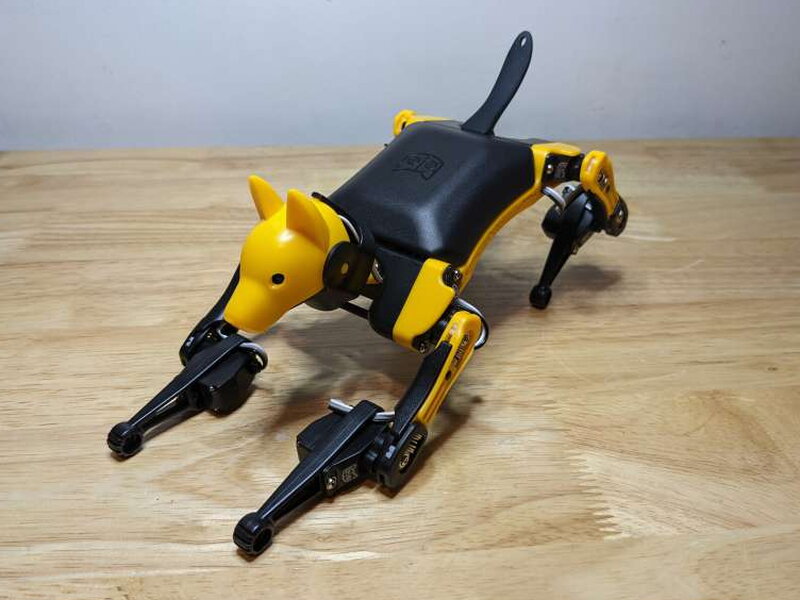
Bittle’s visual inspiration is obvious. It looks like a small yellow and black cousin of Spot, complete with long articulated legs and a low body. I do not mind the resemblance, because the general layout makes sense for a quadruped robot. The difference is scale and purpose. Spot is rugged and autonomous. Bittle is light, plastic, and meant to be handled, rebuilt, tuned, and reprogrammed.
Each leg uses two tiny servos, one at the shoulder and one at the elbow, giving Bittle enough range of motion to stand, walk, sit, stretch, and perform pre programmed tricks. The rounded feet and spring like leg shape help sell the robot dog illusion while the IMU helps the controller understand orientation and movement.


Unlike Spot, Bittle has a head, and the head adds a lot of personality. The black silicone tail hides the infrared receiver, so the remote can send commands as soon as the robot is powered on. The remote itself works without pairing, but its membrane buttons use small icons that are not always easy to decode.


The 7.4V Li-ion battery has a Micro USB charging port on one side and a power connector on the other. Petoi includes a USB-A to Micro USB cable that charges the battery and also connects the motherboard to a PC through the USB adapter.


The NyBoard v1 is the heart of the kit. It is Arduino compatible and combines servo control, an infrared receiver input, a buzzer, an IMU, serial UART, I2C, Grove ports, RGB LEDs, and expansion sockets. Petoi also leaves room for the USB, Bluetooth, and WiFi adapters, plus a 2 x 5 socket for mounting a Raspberry Pi when a project needs more processing power.


Building Bittle
The build is the first real reward. Handling every piece makes the robot easier to understand later, especially when something needs to be calibrated or reconfigured. The Base Kit’s partly assembled legs are welcome because installing tiny springs in every leg section would have made the process much more fiddly.
Petoi’s online instructions are detailed, but I would not call them clear. Several steps leave too much room for interpretation, and I had to backtrack more than once. The included screwdriver also did not help. It is too small for the screws, so using a better Phillips screwdriver from your own toolbox will save time and frustration. Most parts eventually reveal the correct orientation, and YouTube walkthroughs can help when the written steps get murky.


Before powering it up, I recommend gently moving every joint through its full range. That check makes sure no wires are pinched and no joint is binding. After that, the battery can be plugged in and charged. The battery light glows red while charging and green when full.


Calibration
Calibration is where Bittle turns from a pile of assembled parts into a robot that can actually behave. The controller needs to know the correct center point for each servo, so the legs, joints, and head move to the intended angles. If the calibration is off, the walking and tricks will be off too.
Bittle starts calibration in the Rest position. In that pose, the upper legs sit at right angles to the body and the lower legs stretch flat on the tabletop. I found the mobile app to be the easiest route, though Petoi also supports calibration through the desktop app.


Petoi includes a small L shaped calibration tool. You hold it against each leg and compare the markings on the leg with the spaces on the tool. In the app, each of the nine servos can be selected and adjusted one degree at a time. It is slow work. If the app cannot bring a servo to a 90 degree angle, you may need to reposition that joint by hand and then fine tune it again in software.


Once the legs looked right, I locked the joints with the remaining screws and tested a few simple moves. Getting through this part takes patience, but it is worth doing carefully. A well calibrated Bittle is much more fun to control.

Control and coding
There are several ways to enjoy Bittle, and that flexibility is the main reason I kept coming back to it. The infrared remote is the simplest path. Once Bittle is built, charged, and calibrated, the remote can trigger pre programmed movements so beginners can see what the robot can do right away.


For me, the best everyday control method was Petoi’s smartphone app over Bluetooth, which requires the Bluetooth module to be installed on the NyBoard. The app includes built in actions such as Sit, Play Dead, and the ridiculous Pee routine. It can also be used like a regular remote for walking Bittle around.
The app can chain functions and save custom commands. Changing the gait is quick, and turning off the internal gyro sensor enables a faster Turbo mode. When building a custom command, the app opens a lite serial console so commands can be tested before saving. Petoi documents the full serial command set in the Petoi Doc Center, along with assembly and programming information.


Connecting Bittle to a PC through the USB adapter opens more serious options. From the desktop tools you can calibrate, update firmware, create skills, and save new movements. The Skill Editor is especially interesting because it lets you tune movements one action frame at a time, almost like animating a stop motion sequence.


The deeper I went, the clearer it became that Bittle is less a toy and more a small robotics platform. The documentation can be frustrating, but figuring out the robot’s behavior is part of the appeal. It will not survive or navigate like Spot, but with a little imagination and code it can do a lot more than the first few remote controlled tricks suggest.

What I liked
- Incredibly versatile and expandable
- Assembly is challenging but doable
- Up and running quickly out of the box
What I would change
- Expensive
- Confusing and deficient instructions
- Requires familiarity with programming for the best experience
Quick Questions
Q: Does it come fully assembled?
A: No, the Base Kit ships partly pre-assembled – body and upper legs are done, but lower legs, head, tail, and wiring still need to be built, about 40 minutes of assembly.
Q: Can it be programmed with real code, not just an app?
A: Yes, it supports Arduino IDE and Python through Petoi’s APIs, plus Scratch-style block coding through CodeCraft.
Q: How long does the battery last?
A: About 1 hour of runtime per charge, with a 2-hour charge time.
Q: Can it connect to a Raspberry Pi?
A: Yes, the NyBoard controller includes a socket for mounting a Raspberry Pi for more advanced projects.
Final thoughts
The Petoi Bittle Open Source Robot Dog is a strong robotics and programming platform for makers who like learning by doing. The Base Kit is just hard enough to feel satisfying, and the partially assembled pieces keep the build from becoming overwhelming. At $259, it is pricey, especially when the instructions cause unnecessary friction, but the open source design, modular hardware, language support, and expansion options give it long term value. I have only started exploring what Bittle can do, and that is exactly why it is so compelling.
Price: $259.00 (Base Kit)
Product Link: Petoi
Source: The sample of this product was provided by Petoi.
RATING: 4 stars


