REVIEW – Nomad’s PowerPack is not trying to be the smallest battery you can toss in a pocket. It is a tough, substantial 9,000mAh charger with a rugged shell, fast charging support, and one unusual extra: Tile tracking built directly into the pack. That mix makes it more useful than a plain external battery, especially if you misplace gear often, though it also makes the Nomad more expensive than many simpler power banks.
Note: This Nomad PowerPack was provided free of charge by Nomad for review. Nomad did not have a final say on the review and did not preview it before publication.
The Basics
The PowerPack is a 9,000mAh external battery built around a rugged, Mil-spec-rated shell, with a Tile tracker built into the body so the whole thing can be located from a phone if it goes missing. It charges through USB-C and puts power back out through both a fast-charging USB-C port and a standard USB-A port.
What You Get
- Nomad PowerPack
- USB-C to USB-A cable
- User manual


By the Numbers
- Capacity: 9,000mAh Li-Ion, 33.3Wh
- Input: USB-C, 5V/3.0A
- Output 1 (USB-C, fast charge): 5V/3.0A, 9V/2.0A, or 12V/2.0A
- Output 2 (USB-A): 5V/2.4A
- Total output: 27W max
- Dimensions: 5.31 x 2.9 x 0.78 inches
- Rating: 1.2M Mil-spec drop protection
- Tracking: Tile integration via Bluetooth
Design and Build
The PowerPack makes a strong first impression. Its shape, weight, matte plastic bevels, and black finish give it a stealthy, military-inspired look, and it feels hefty in the hand, more like a piece of field gear than a slim battery pack. That substantial size and weight are also part of the trade-off, since this is not the most compact power bank to carry around daily.


The rugged theme is not just cosmetic. Nomad rates the pack for 1.2M Mil-spec drop protection, meaning it is built to survive a 1.2 meter edge drop without damage, and the back label backs that up alongside the full input and output specs.

Charging the Battery
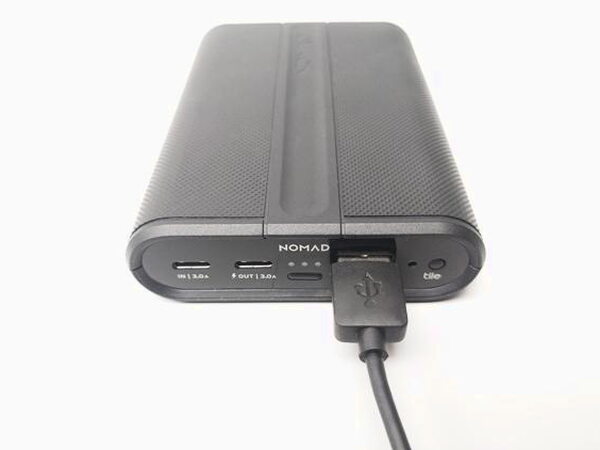
My unit arrived with no usable charge, one orange indicator light showing it was low. To recharge, plug the USB-C end of the included cable into the IN port and connect the USB-A end to a powered USB port or wall charger. Using the included cable with my Anker powered USB hub, the Nomad charged from empty to full in about two hours.


When the pack is full, three white lights show along the top. Nomad also built an ambient light sensor into the end of the battery, between the USB-A port and the Tile button, so in a dark room the status lights automatically dim rather than staying bright enough to disturb your sleep.

Charging Devices
The small button below the charge indicators powers the unit on. In testing, the Nomad charged an Android Nexus 5X from 10% to 100% in about two hours and thirty minutes using the included cable connected to the USB-A output. A USB meter clocked one reading at 5.08V, 1.05A, and 5.334W during that test, with voltage staying close to 5.00V, current averaging around 1.25A, and wattage ranging from 5.25W up to 8.75W over the full charge. The USB-A output is rated at 2.4A, though my real-world results ran somewhat below that number.

To get the most from the fast charging on the USB-C output, newer Android phones need a USB-C to USB-C cable, while iPhones need a USB-C to Lightning cable. The PowerPack does support USB-C, but not USB Power Delivery, so it will only trickle-charge a 2016 MacBook rather than fast-charge it.

Tile Tracking
The built-in Tile feature is simple to set up: open the manual, scan the QR code, and follow the prompts to install the Tile app on Android or iPhone. After that, selecting the Nomad in the app and tapping Find will trigger its locator sound if the pack is within Bluetooth range.

If the PowerPack is within about 100 feet, it plays a repeating alarm tune until you locate it and press the Tile button. The alarm is not very loud, so it can take some hunting if the battery is buried in a backpack or wedged behind a couch. Outside Bluetooth range, Tile’s community feature can still help. When another Tile user’s device passes near your Nomad, the app can update you with its last known location.
What Could Be Better
The size and weight that give this pack its rugged feel also make it one of the bulkier options to actually carry every day. The price runs higher than plenty of simpler power banks with similar capacity, and the Tile locator alarm is quiet enough that it does not always help much once the pack is out of sight. USB Power Delivery is also missing, so newer laptops will only trickle-charge rather than fast-charge from this pack.
Quick Questions
Q: Does the Nomad PowerPack support USB Power Delivery for fast-charging a laptop?
A: No. It supports USB-C but not USB Power Delivery, so a 2016 MacBook only trickle-charges rather than fast-charges.
Q: How rugged is the PowerPack rated?
A: It’s rated for 1.2M Mil-spec drop protection, meaning it’s built to survive a 1.2-meter edge drop.
Q: How loud is the Tile locator alarm?
A: Not very loud. It can take some hunting to find if the pack is buried in a backpack or wedged somewhere.
Q: How long did it take to fully charge the PowerPack itself?
A: About two hours from empty to full using the included cable and a powered USB hub.
Final Thoughts
The Nomad PowerPack set out to be a rugged, trackable alternative to a plain external battery, and it delivers on both fronts. It survives drops that would crack a typical power bank, charges devices reliably, and the built-in Tile tracker is a genuinely useful bonus if you tend to misplace gear. It costs more than simpler batteries and is not the pack to grab if compact size is the priority, but for anyone who wants a seriously tough charger they can also locate from their phone, the price makes sense.
Price: Check current pricing at Nomad or Amazon
Where to buy: Nomad or Amazon
What I like: Genuinely rugged Mil-spec build, built-in Tile tracking works well within range, dims its own status lights in the dark, reliable charging performance
What I don’t: Bulkier and heavier than most power banks this size, costs more than simpler alternatives, no USB Power Delivery support, Tile alarm is quiet enough to be easy to miss


