
REVIEW – With electronics, I’m firmly in the camp that smaller is always better. Cramming supercomputing power into a palm-sized device feels like the consolation prize for every promise of the future we never actually got, like flying cars. Intel’s Next Unit of Compute (NUC) mini PC line is a good example of just how much a small, powerful computer can do.
I recently ran the NUC11PAHi7 through its paces, and what stands out is the solid build, the generous spread of ports, and genuinely strong performance. At $495 it runs a little pricier than comparable mini PCs, but Intel’s track record closes that gap. Worth noting: Intel has said it’s pulling back on “direct investment in the Next Unit of Compute (NUC) Business,” though partners like ASUS may keep these popular mini PCs on the market going forward.
The Basics
The NUC11PAHi7 is a compact mini PC running an Intel Core i7 processor alongside Intel Iris Xe Graphics. My review unit shipped with 16GB RAM, a 512GB SSD, and a wide port selection, USB-C 3.2, USB-A 3.2, HDMI, Mini DisplayPort, and Thunderbolt 4 among them, plus Wi-Fi and Bluetooth.
In the Box


- Intel NUC 11 NUC11PAHi7 Mini PC
- VESA Mounting plate and screws
- Power brick and cable
- User manual
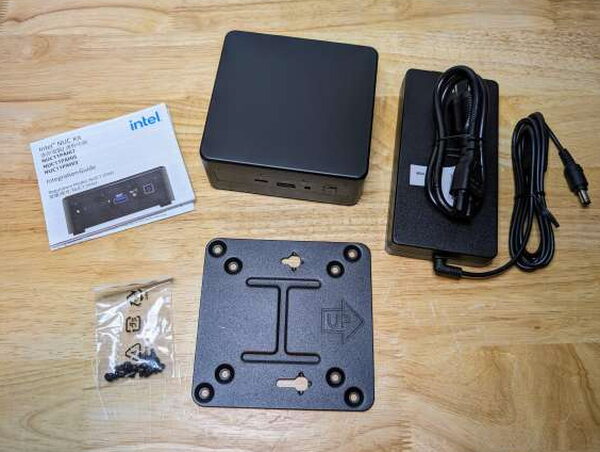
By the Numbers

- Series: NUC11
- Item model number: NUC11PAHi7
- Hardware Platform: PC
- Operating System: Windows 11
- Processor:
- Intel 2.8GHz core i7-1165G7
- 4.70GHz turbo frequency
- 8 threads
- 12MB Intel Smart Cache
- Number of Processors: 4
- Computer Memory Type: DDR4 SDRAM (16GB as tested, support for up to 64GB)
- Hard Drive Interface: SSD (512GB as tested)
- SATA ports: SATA 6.0 Gbps port for 2.5″ storage device
- Graphics Coprocessor: Intel Iris Xe Graphics
- Max Screen Resolution: 3840 x 2160 pixels
- Wireless Connectivity: Wi-Fi 6, 802.11ax, Dual Band, 2×2 Wi-Fi + Bluetooth 5.2
- LAN: Gigabit Ethernet (10/100/1000/2500 Mbps) LAN subsystem
- Power Supply: 19V DC
- Weight: 3.1 pounds
- Dimensions: 4.6 x 4.4 x 2 inches
Design and Build
Design-wise, the NUC 11 keeps things simple, wrapped in a dark gray aluminum shell that looks sleek and also helps pull heat off the unit.

Up front: an SD Card slot, three USB-A 3.2 ports, two Thunderbolt 4 ports, and a 3.5mm audio output.


Mounting and Opening It Up


Getting Started
Getting the Performance Kit going is easy, basically plug-and-play if the default setup and the preloaded Windows 11 work for you.

Given all the recent stories about mini PCs arriving in the US with malware preinstalled, running a thorough malware scan is something I now do with every new computer. Good news here: the NUC 11 came through clean.


NUC Software Studio
To tweak the NUC 11 further, Intel offers its NUC Software Studio app, which keeps an eye on performance and lets you adjust a range of preferences.


Living With It

I ran the NUC 11 for a few weeks doing web browsing, email, and writing reviews. For lightweight work like that, which doesn’t lean hard on the processor, it did a fantastic job.

The Iris Xe Graphics won’t cut it for video editing or high-FPS titles like Starfield or Call of Duty, but it handles everyday tasks just fine. I’ve also put the NUC 11 to work as a Plex Media Server, replacing my old Mac Mini in that role, and it manages video transcoding on the fly more smoothly than I expected from something this small.
Benchmarks
Before handing Plex duties over to the NUC, I ran a Cinebench test to see how the CPU and GPU hold up. Cinebench produces benchmark scores and runs a machine through a series of tests to gauge how much load it can take.


All told, I’m genuinely pleased with how the NUC 11 held up, both in testing and in everyday use. That tiny footprint hides just how capable and flexible it actually is, whether it’s running a media server, acting as a home automation hub, or handling everyday email and word processing.
The Good
- Easy to setup and modify
- Plenty of ports
- Excellent performance
The Not So Good
- A bit more expensive than comparable mini PCs
- No built-in audio speaker
- Barrel plug power instead of USB-C
Quick Questions
Q: What operating system does the NUC 11 come with?
A: Windows 11, preloaded and ready to set up out of the box.
Q: Can the RAM and storage be upgraded?
A: Yes, opening the back reveals accessible RAM (supports up to 64GB) and the M.2 SSD, plus room for an additional 2.5-inch SSD.
Q: Can it handle video editing or gaming?
A: Not really. The Iris Xe integrated graphics aren’t built for video editing or high-FPS games, though it handles everyday tasks and even ran a Plex media server smoothly.
Q: Does it include a screen mounting option?
A: Yes, a VESA mounting plate and screws are included, letting it mount behind a compatible monitor.
The Verdict
For a lot of tasks and setups, the Intel NUC 11 NUC11PAHi7 Mini PC makes a great substitute for a full-size PC. Between its small size, sturdy build, and strong performance, it stands out from other mini PCs in its class. Intel’s standing as a trusted high-end computer brand helps make sense of the $495 price too. If you’re short on space but still need real computing muscle, the Intel NUC 11 is a solid pick.
Price: $495.00
Product Link: GeekNUC
Source: The sample of this product was provided by GeekNUC.
RATING: 4 stars


