
REVIEW – Thermal imaging is one of those gadget features that still feels a little like science fiction when it works. It can help you spot animals in darkness, look for hot areas in a wall or electrical cabinet, or just have fun seeing the heat that everyday objects leave behind. The InfiRay Xinfrared T2 Pro Thermal Monocular brings that trick to a phone connected accessory instead of a standalone thermal camera. At $419, it is far less expensive than professional thermal gear, and it can capture photos and videos through your phone. It also has compromises, including low resolution, manual focus, and a handle kit that I would mostly leave in the box.
What it is
The T2 Pro is a very small infrared camera module with a USB Type C connector. The Android version I tested works with Android 6.0 and newer, while a separate version is sold for iPhones. Your phone powers the camera and runs the Xinfrared app, which is available for Android and iOS. InfiRay lists an observing distance of about 1300m, a 256×192 thermal resolution, 25Hz frame rate, 12μm pixel pitch, 13.0mm focal length, and a 13.6°×10.2° field of view. Focus is manual, magnification is 2X to 15X continuous digital zoom, and the body is rated IPX4 for water resistance.
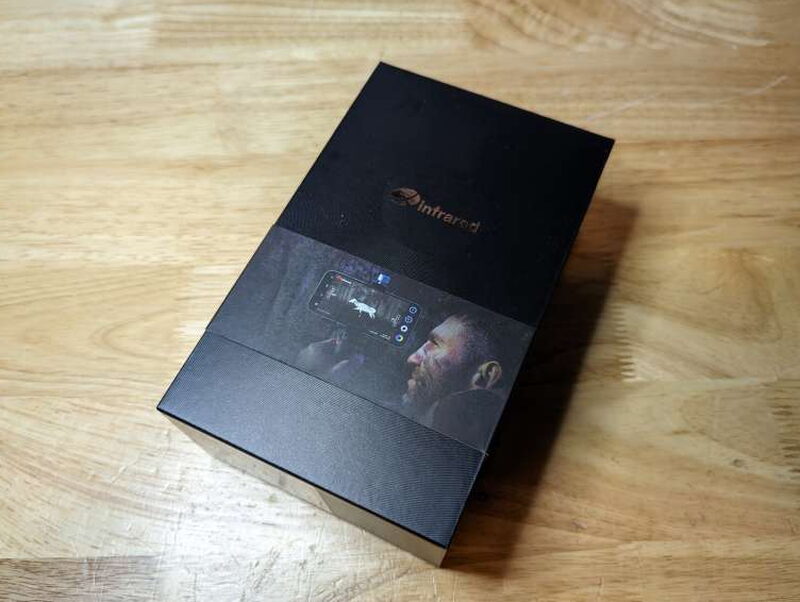

The packaging makes the T2 Pro feel more premium than its price might suggest. The outer box has a dramatic hunting image on the front, and inside it the camera sits in a fitted protective case surrounded by dense foam.
Included gear and specifications
The main package includes the InfiRay Xinfrared T2 Pro Thermal Monocular, user manual, USB Type C cable, Micro USB to USB Type C cable, Allen wrenches, and protective case.

The optional handle kit is sold separately. It includes the handle, mounting bracket, T2 Pro protective housing, and a laser spotter. The laser spotter does not include a battery.

- Model: T2 Pro-Android
- System Support: Android 6.0 and above
- Interface: USB Type C
- Observing Distance: ≈ 1300m
- Mobile App: Xinfrared
- Resolution: 256×192
- Pixel Pitch: 12μm
- Spectral Band: 8~14μm
- Water Resistance Level: IPX4
- Focal length: 13.0mm
- FOV: 13.6°×10.2°
- Focus Mode: Manual
- Magnification: 2X~15X continuous digital zoom
- Frame rate: 25Hz
- NETD: ≤50mk
- MRTD: ≤500mK
- Operating temperature -10℃~+50℃
- Temperature Measurement Range: 0℃~+80℃
- Power Consumption: <350mW
- Unit Size: 1in. x 1in. x 1in. (26mm × 26mm × 26.6mm)
- Unit Weight: <20g
- Image Enhancement: Digital Detail Enhancement (DDE)
- Reticle: Hot/cold spot tracking
- Color palettes: Thermal Eye, Red Head, Black Hot, White Hot, Iron Red, Ninja
- Cross cursor: Tracking and focusing
Hardware design
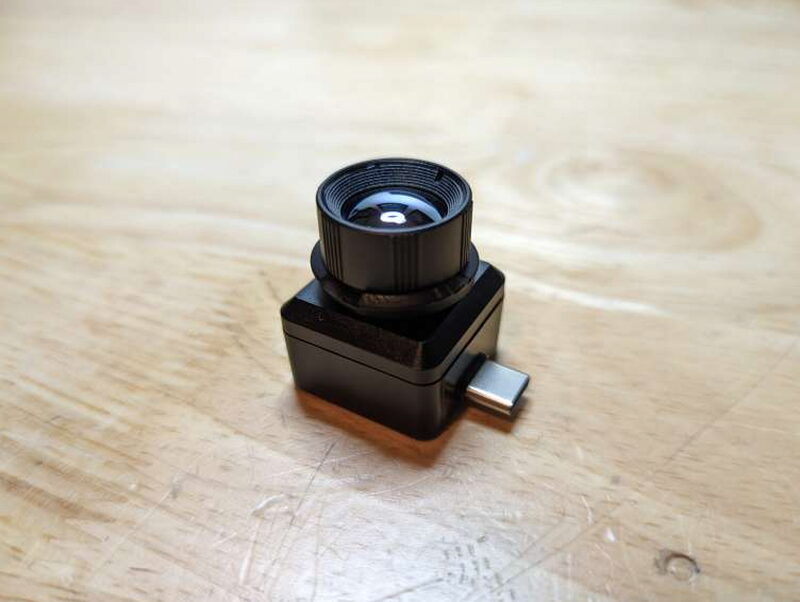
The camera itself looks almost impossibly small for what it does. It is basically a compact lens cube with a USB Type C plug, while the phone supplies the screen, controls, storage, and power.


The body is hard plastic with a smooth exterior and a textured rear panel carrying the Xinfrared logo. It feels solid enough in hand, but the glass lens and lens cap are the parts I worried about most.

The lens cap was my first disappointment. It is a rubber cap tethered to a small rubber ring around the lens, and the tether snapped the first time I removed the cap with very little force.

Focus is adjusted by holding the base of the T2 Pro and rotating the lens housing until the picture is sharp. Manual focus is probably one reason the module can stay so compact, but it also means you have to slow down and tune the image whenever your subject distance changes.


The included cables are mainly useful when the camera is installed in the handle kit. For normal use with a USB Type C Android phone, the T2 Pro can plug straight into the phone. The protective case is well made, with thick foam that holds the camera and leaves space for a cable.
The optional handle kit


The handle kit tries to turn the phone and camera into a handheld thermal viewer. The handle has a standard 1/4 inch camera mount, the aluminum bracket holds the phone and camera, and the small laser spotter mounts underneath. On paper, that sounds helpful. In practice, it made the T2 Pro more awkward than using the camera directly on the phone.
Assembly


Assembly starts with the padded T2 Pro mount on one side of the bracket and the larger phone clamp on the other. Two 1/4 inch holes beneath the phone mount let you attach the handle, a tripod, or another camera accessory. The laser slides onto an adjustable dovetail mount that can be positioned with the included Allen wrench.


The 3D printed protective housing slides over the T2 Pro so the USB Type C plug lines up with the elongated opening. After that, a metal knob clamps the T2 Pro in place, and a matching knob secures the phone. I had to try a few orientations before settling on both ports facing left, then I connected the camera to the phone with the included cable.
App experience

Most of my time with the T2 Pro was spent using it directly on my phone, and that was the best setup. The camera weighs less than 20g, so holding the phone in landscape orientation felt natural.


The Xinfrared app is serviceable rather than polished. The icon meanings were not always obvious, so I learned some controls by tapping them on and off. The menu is more useful, with options for flipping or rotating the image, enabling temperature tracking, changing units, and adding overlays such as a compass, weather, speedometer, and movable reticle. If you enable too many overlays, the display gets crowded, and the app occasionally reset itself and lost my settings.

The handle kit did not improve that experience. I found it easier to hold the phone normally. The laser spotter also seemed pointless because I could not see its dot through the T2 Pro view.
Thermal performance
The T2 Pro is much better at its main job than it is at pretending to be a handheld monocular. It finds heat signatures clearly, and the six palettes give you different ways to make those heat sources stand out: Thermal Eye, White Hot, Black Hot, Red Head, Ninja, and Iron Red.


The picture in picture mode is especially useful because it combines the phone camera view with the thermal image. That helps aim the T2 Pro, which matters because the camera begins around 2X zoom and needs manual focusing.


Thermal Eye is the most dramatic palette, but White Hot was the easiest mode for everyday scanning. Indoors, the fixed starting zoom felt tight in my small apartment, yet the T2 Pro still showed how useful it could be for checking heat around electronics, bedding, or possible problem spots in a home. Outdoors, it was more impressive. It detected warm objects and people in total darkness, picked out the recently driven car among parked vehicles, and kept temperature tracking visible as I moved farther away from an electrical transformer. I cannot confirm the full 1300m range claim, but the practical reach was better than I expected. The mirror test also confirmed a normal thermal camera limitation: reflected surfaces do not produce reliable temperature readings.
Video capture
Recording video is as easy as taking still photos. The app does have one annoying habit: it splits recordings into three minute files. I recorded a pot of water heating, boiling, and cooling, then sped up about thirty minutes of footage. For that kind of stationary shot, a regular camera tripod worked better than the handle kit.

What I liked
- It is genuinely plug and play when connected directly to a phone
- Very small hardware with a useful set of app features
- Much less expensive than more professional thermal imaging devices
- Photo and video capture through the phone is convenient
What I don’t
- The handheld bracket is clumsy, and the laser spotter adds little value
- The Android and iPhone versions are separate products
- It is not really a standalone monocular
- Manual focus and 256×192 resolution are real limits
- The lens cap tether broke almost immediately
Quick Questions
Q: Does it work as a standalone monocular?
A: No, it needs to be plugged into a phone via USB-C – the phone supplies the screen, power, and app.
Q: Is the optional handle kit worth buying?
A: Not really, per this review – it made the camera more awkward to use than just holding the phone directly, and the included laser spotter added little value.
Q: Does focus adjust automatically?
A: No, focus is fully manual, done by rotating the lens housing.
Q: Is the Android version compatible with iPhones?
A: No, Android and iPhone versions are sold as separate products.
Verdict
The InfiRay Xinfrared T2 Pro Thermal Monocular is a capable little thermal imager if you approach it as a phone accessory, not as a true monocular. For hunting, search and rescue, home inspection, security checks, or simple heat spotting, it delivers useful results from a very small camera. The $419 price keeps it within reach compared with thermal devices that cost thousands, and the ability to save photos and videos with phone audio is a real advantage. The optional handle kit is the weakest part of the package, and the low resolution, manual focus, app quirks, and separate Android or iPhone hardware versions all matter. Even with those caveats, the T2 Pro is a solid budget thermal tool for people who have a real use for seeing heat signatures.
Price: $419
Product Link: InfiRay
Source: The sample of this product was provided by InfiRay.
RATING: 3 stars


