
REVIEW – The software company I work for is obsessed with security. The training sessions, emails, and reminders are endless, and for very good reason. Security, particularly the cyber variety, is a huge headache for everyone from national governments all the way down to corner bodegas and regular people like me. According to a 2018 report, the U.S. government estimated that malicious cyber activity cost the U.S. economy between $57 billion and $109 billion in 2016 alone. Statistics like that keep me up at night. With security always at the forefront of my mind, I was more than happy to check out the Apricorn Aegis Secure Key 3NXC. For something so small, this USB-C drive has more tricks up its sleeve for thwarting would-be cyber criminals than you would guess. At $179 for the 128gb version I tested, the feature-rich Aegis is a great deal, especially compared to other higher priced encrypted storage devices in its class.
The Aegis Secure Key 3NXC is a USB 3.2 Type C flash drive protected by 256-bit hardware encryption. You can grab it in six capacities, running the gamut from 4gb all the way up to 128gb.
What’s in the Box


- Apricorn Aegis Secure Key 3NXC
- Silcone Cover
- Quick Start Guide

By the Numbers
- Data Transfer Rate: USB 3.0 – up to 5 Gbps
- Power Supply: USB Port / Internal 3.7 Li-Polymer Rechargeable Battery
- Interface: USB 3.2 type C
- Dimensions: 3.18 in x.72 in x.37 in / 81 mm x 18.4 mm x 9.5 mm
- Weight:.78 oz / 22 g
- Warranty: 3 year limited
- Sizes: 4gb, 8gb, 16 gb, 32gb, 64gb, 128gb
- Encryption Algorithm: AES-XTS 256-bit
- International Protection Rating: IP-68
- Security Requirement Level: FIPS 140-2 Level 3 Validation Pending
- System Requirements: Windows, Mac, Linux, Android and Symbian systems, or any powered USB OS with a storage file system

Design and Build
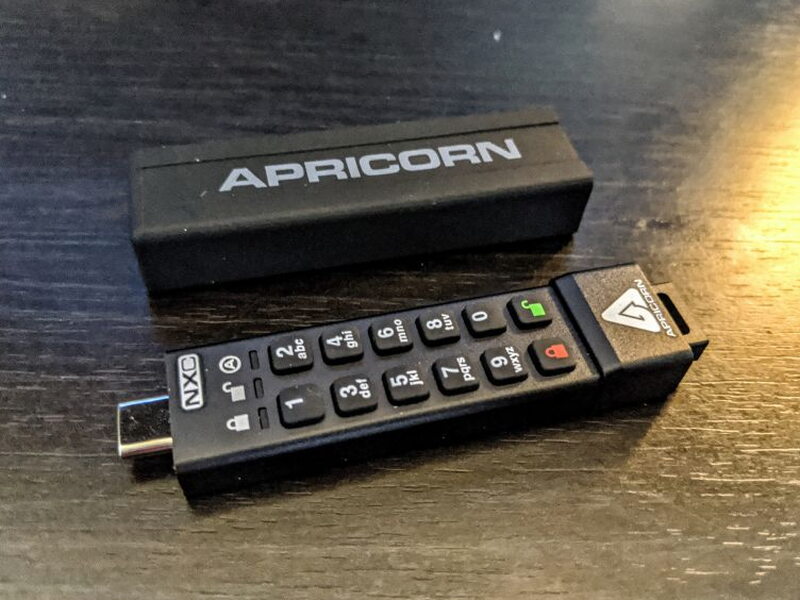
Holding the Aegis 3NXC just feels right, and the weight of that matte aluminum shell practically radiates a sense of security. Every keypress on the rubberized keypad clicks back with a nice, responsive feel. Both the keypad and the whole unit carry an IP-68 water and dust rating, as tough as that scale goes, and the keys wear a special polymer coating meant to hide which buttons you press most often.

One end holds a USB-C connector, and the opposite end has a keychain loop built right in. What makes the 3NXC special is that it’s the first encrypted flash drive to include a USB-C connector built in, so you can plug straight into that popular port without reaching for a USB-A to C adapter.


The Silicone Cover
Early on, I’ll admit I was a bit uneasy about that little USB-C connector sitting out in the open when I wasn’t using it. Thankfully, Apricorn tosses in a silicone cover that slips tightly over the entire unit while you’re carrying it around or when it’s just sitting idle.

It hugs the drive tightly enough that I stopped worrying about it slipping off while rattling around in my backpack or pocket.

Flip the Aegis 3NXC over and the back lays out its various certifications plus other handy details like the model number.

Security Under the Hood
Some of the best things about the Aegis 3NXC you never actually see, like the layer of hardened epoxy inside that guards against physical tampering. There’s also a built-in diagnostic mode that checks the keypad and helps sort out problems, and you can set it up to behave as either a fixed disk or as removable media. Dig a little deeper and you’ll find the 3NXC runs a hardware-based AES-XTS 256-bit algorithm for its encryption, which satisfies the NIST FIPS 140 cryptography standard the U.S. government requires for safeguarding sensitive data.

The 3NXC hides another trick up its sleeve: Brute Force Protection. Switch it on, and if someone tries to physically brute force their way in, the device wipes its own encryption key and kills any chance of ever decrypting the data stored on it.

Setting It Up
Since the Aegis 3NXC handles encryption in hardware, there’s nothing to install, no drivers, no software packages. I love that. Beyond making setup painless, it lets the 3NXC run on just about any operating system while staying incredibly secure and shrugging off software-based hacking attempts. An internal rechargeable battery powers the 3NXC, so the first time you use it, it’s smart to leave it plugged in for roughly 80 minutes to top the battery off completely. One more thing worth flagging: never punch in codes or touch the keypad while the unit is connected to a computer, since that’s an easy way to wreck the USB-C port or the plug on the end of the Aegis.

The fastest route to getting the Aegis 3NXC going is to follow the Quick Start Guide and set up an Admin PIN. From then on, locking and unlocking couldn’t be simpler: press the lock button to wake the unit, punch in your PIN, then press the unlock button. A green light means you’re in, while a red one tells you the PIN was wrong. Every bit of setup and configuration happens through the keypad, with the LED lights giving you all the feedback.
Once you’ve walked through that easy Admin PIN setup, a single user is all set, and after the PIN exists you can plug the drive in and get to work. That said, the 3NXC is capable of far more than that. With an Admin PIN in place, you can jump back into Admin Mode to add a User PIN. Setting up a User PIN lets you grant someone access without handing over the keys to the Admin Setup Options. That user gets limited functionality and no admin rights over the unit, yet they can still reach the data, change their own PIN, and switch the drive between Read Only and Read / Write mode.
Admin Mode is where you can dial in a bunch of the 3NXC’s other great features. From there you can create One-Time-Use Recovery PINs for those moments when a User PIN slips someone’s mind. You can also lock the device down to Read-Only when the situation calls for it. Admin Mode lets you set a minimum PIN length too, tightening up the 3NXC’s security even further. There’s an Unattended Auto-Lock option as well, which seals the unit after a set stretch of inactivity so nobody can sneak in if you leave it unlocked. The neatest thing you can turn on from Admin Mode, though, is the Self-Destruct PIN. Set that separate PIN and, when it’s entered, the unit erases everything and looks as though no data was ever written to it in the first place. Very James Bond-esque.
Living With It
I ran the Aegis through its paces on my 2017 Razer Blade Pro. Even though the Razer sports a Thunderbolt USB-C port, I never once hit the 5Gbps speeds the drive supposedly delivers.

I benchmarked the Aegis with a couple of different tools, including BlackMagic’s Disk Speed Test and CrystalDiskMark. The numbers landed right about where most of my other USB-A flash drives do, nothing to write home about. Still, I had no trouble shuttling big chunks of data on and off the 3NXC.

Sure, I dropped a few random large video files onto the Aegis to put it through its paces, but most of what I’ll actually keep on it are spreadsheets full of important passwords, account numbers, and financial data, so read/write speeds honestly aren’t a big deal to me. And when you factor in all the on-the-fly encryption and decryption going on behind the scenes, I came away pretty impressed with how quick the Aegis was.
Throughout all my testing, the 3NXC faithfully stayed unlocked and running while it was hooked up to my laptop, then locked itself the instant the laptop powered down or the disk got ejected, whether cleanly or not. I wasn’t bold enough to try the Self-Destruct Feature just yet, but I have faith it’ll do its job if some villain ever takes me hostage and demands the PIN to my modest Bitcoin stash.
Made-up Bond villains aside, the Aegis 3NXC is going to ride along in my EDC for a very long time.
The Good
- Easy software-free set up
- Tons of features – Works on any operating system
- Reasonably priced
The Not So Good
- A detailed battery life indicator would be great
Quick Questions
Q: Does the Aegis 3NXC require any software or drivers to work?
A: No, encryption happens entirely in hardware, so there’s nothing to install; it works on any OS with a powered USB port and a storage file system.
Q: What happens if someone tries to brute-force the PIN?
A: With Brute Force Protection switched on, the drive wipes its own encryption key after repeated failed attempts, permanently destroying access to the data.
Q: Can you set up separate access for another person?
A: Yes, once an Admin PIN exists you can add a User PIN that grants data access without handing over admin rights over the unit.
Q: Did it hit its rated 5 Gbps transfer speed in testing?
A: No, real-world read/write speeds landed in the 65-77 MB/s range in benchmark testing, similar to typical USB-A flash drives, not the full rated 5 Gbps.
The Verdict
The Aegis Secure Key 3NXC is a fantastic bit of hardware, and it’s worked its way into a central role in my cyber security setup. This little USB drive suits so many of today’s remote-work situations, whether you’re a pro mapping out a security strategy or just a home user looking to layer on some extra protection. Priced at $179, the 3NXC lands right in line with the competition and packs in a ton of useful features.
Price: $179.00
Product Link: Apricorn
You can also pick it up at Tiger Direct for $89.99, at B&H Photo Video for $109.00, and on eBay for $129.95.
Source: The sample of this product was provided by Apricorn.


